

Start here · Web, iPhone and Android
Your first automatic ad skip
Choose a show you love and let PurerPodcasts handle detected ad breaks. Here’s how to get started and keep control of what you hear.
Listen on the web, iPhone or Android. A subscription unlocks automatic ad skipping for your selected feeds.
Get started on the web
We make PurerPodcasts. This guide explains our approach and the tradeoffs to consider.
Transcripts and chapters are available on the web, iPhone and Android. Features may vary by platform and app version.
PurerPodcasts is available in your browser, on iPhone and on Android. You can use the player free, with no in-app ads. Automatic skipping requires a subscription for the feeds you select. Subscribers can also generate transcripts for downloaded episodes outside their selected ad-skipping feeds.
See the recorded app preview for the timeline and skip countdown in action.
Start in your browser
- Choose a web plan, create your account, verify your email and complete checkout. If you already subscribe, sign in with the same account to check your membership.
- Choose a public podcast during setup, or open Private feeds and add a supported private RSS URL. Enable ad skipping for that feed.
- Let PurerPodcasts handle ad detection in the background. Detected breaks appear on the timeline and are skipped during playback. Analysis continues even when your browser is closed.
When you enable a show, PurerPodcasts starts with its latest episode. After setup, we automatically check for and analyze new releases while your subscription and ad skipping remain enabled. You do not need to keep your browser open for this background preparation.
1. Choose a familiar show
Find a podcast you already listen to, follow it, and choose an episode. If you want automatic skipping, select a subscription and enable it for that show's feed. Compare the 3-, 10-, and 20-feed plans first.
Web checkout or your app store shows your price, renewal terms, and any introductory offer you are eligible for before you subscribe.
2. See detected breaks on the timeline
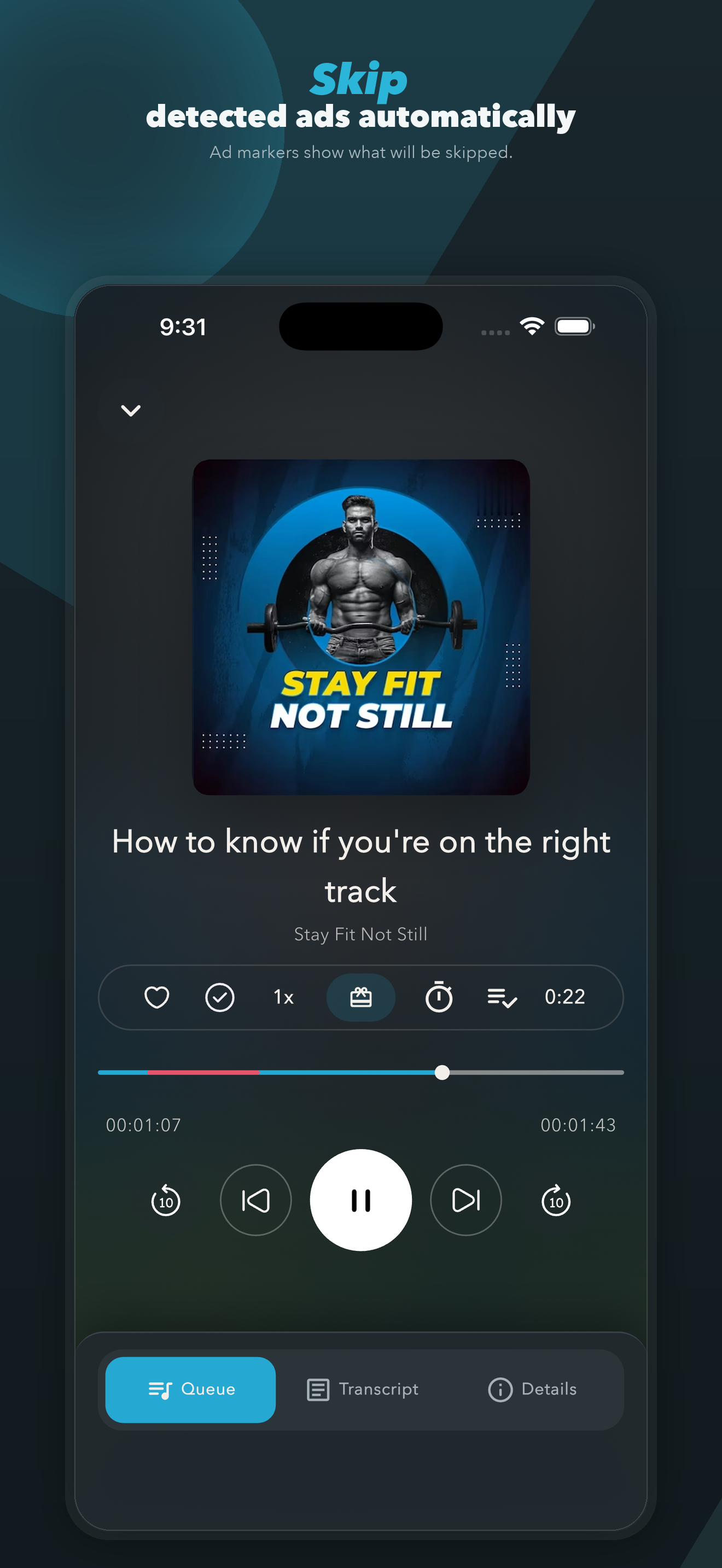
Colored markers show the ad breaks PurerPodcasts has detected. You can review them in the player and choose to hear a segment or correct a break.
3. Listen and keep the choice
When playback reaches a detected break, PurerPodcasts handles the skip. If you want to hear the segment, use the Keep control during the countdown. Review the player controls before relying on them while driving or doing another activity that needs your attention.
You can review or edit a detected break and report a missed ad or incorrect result.
What if an ad doesn't skip?
If an episode is still being analyzed, automatic skipping becomes available when its ad markers are ready. This can happen with a newly enabled show or a new release; analysis time varies. Check the episode’s status in the player.
Adding a show starts analysis of its latest episode; its older archive is not all analyzed automatically. For private RSS feeds, see how new episodes are discovered.
On-device backup detection can also help identify ads when the main analysis has no ad results. It is a best-effort fallback; check the available markers and controls in your player.
- Check that automatic skipping is enabled for this show's feed and included in your subscription.
- If analysis failed, use Start analysis in the web player to try again. Check that the feed still provides playable audio.
- If analysis is ready but a break was missed, use the reporting controls. You can still use normal playback controls.
Still stuck? Contact support with your device, app version, show, episode, and what happened. Please don't send passwords or private-feed access tokens.
Manage your subscription
For a web purchase, open Billing in the web app to manage your subscription. For an app-store purchase, use the store account that purchased the subscription. Deleting the app does not cancel recurring billing. Follow the instructions for subscriptions purchased through Apple or subscriptions purchased through Google Play. Your store explains your current billing and cancellation options.
Ready to bring more of your library over? Read the switching guide.
Try PurerPodcasts
Spend your time on the podcast, not the ads.
Listen on the web, iPhone or Android. A subscription unlocks automatic ad skipping for your selected feeds.
Web public beta · Plus Monthly: $3.99/month after trial. Eligible new subscribers; payment details required.
Compare web plans →Free player. Automatic ad skipping requires a subscription.